Fix 4 Website Mistakes That Keep Local Businesses Out of Google and AI Search
- Skill level
- Beginner
- Time to implement
- 90 min
- Cost
- Free
- Platform
- Tools
- Google Search Console, ChatGPT
- Outcomes
- More traffic, Free to do, Beginner friendly
- Last verified
- Nov 14, 2026
Tony Jung
Original strategy by Tony Jung. Watch the original on Instagram.
Summary
Many local business websites look fine to customers but are hard for Google and AI search to understand. This playbook fixes the four most common problems: a site that was never submitted for indexing, services crammed onto one page, AI-generated city pages that copy the same text, and pages with no heading structure. Each fix is free and can be done in an afternoon.
Set upWhat you need
Access to your website's editor (WordPress, Wix, Squarespace, Shopify, or similar)
A free Google Search Console account verified for your domain
A list of every service you offer and the towns you serve
Real material for each area: past project photos, short job write-ups, and customer reviews
About 90 minutes for a first pass
Do thisStep by step
- 1
Get your site indexed by submitting a sitemap
If Google has not indexed your website, it will never show up. In Google Search Console, open Sitemaps and submit your sitemap. Most website builders and SEO plugins create the sitemap for you; you just have to submit it. Reel Playbooks addition: the sitemap usually lives at
yourdomain.com/sitemap.xmloryourdomain.com/sitemap_index.xml. After submitting, check the Pages report a few days later to confirm your pages show as indexed, and see Google's sitemap guide if you need to create one. - 2
Give every service its own page
When someone searches "heat pump installation near me" and that service is one line on a page with 12 others, Google cannot tell what you offer. Give every service its own page with its own URL, for example
yoursite.com/heat-pump-installation/. Reel Playbooks addition: on each page, cover what the service includes, who it is for, typical cost or process, areas served, a few reviews that mention that service, and a clear call or quote button. Link each service page from your main Services page. - 3
Replace AI copy-paste city pages with real local proof
Asking ChatGPT to write the same location page over and over with a different city name goes against Google's spam policies, which Google calls scaled content abuse. Instead, give AI your real experience, past projects, and customer reviews from that area, then have it write the page. Using AI is not the problem; being lazy is. Reel Playbooks addition: a useful prompt: "Using these 3 project notes and 2 reviews from Marietta, write a service area page for heat pump installation in Marietta. Mention the specific neighborhoods, problems, and results in the notes. Do not invent details." Only build pages for areas where you have real work to show.
- 4
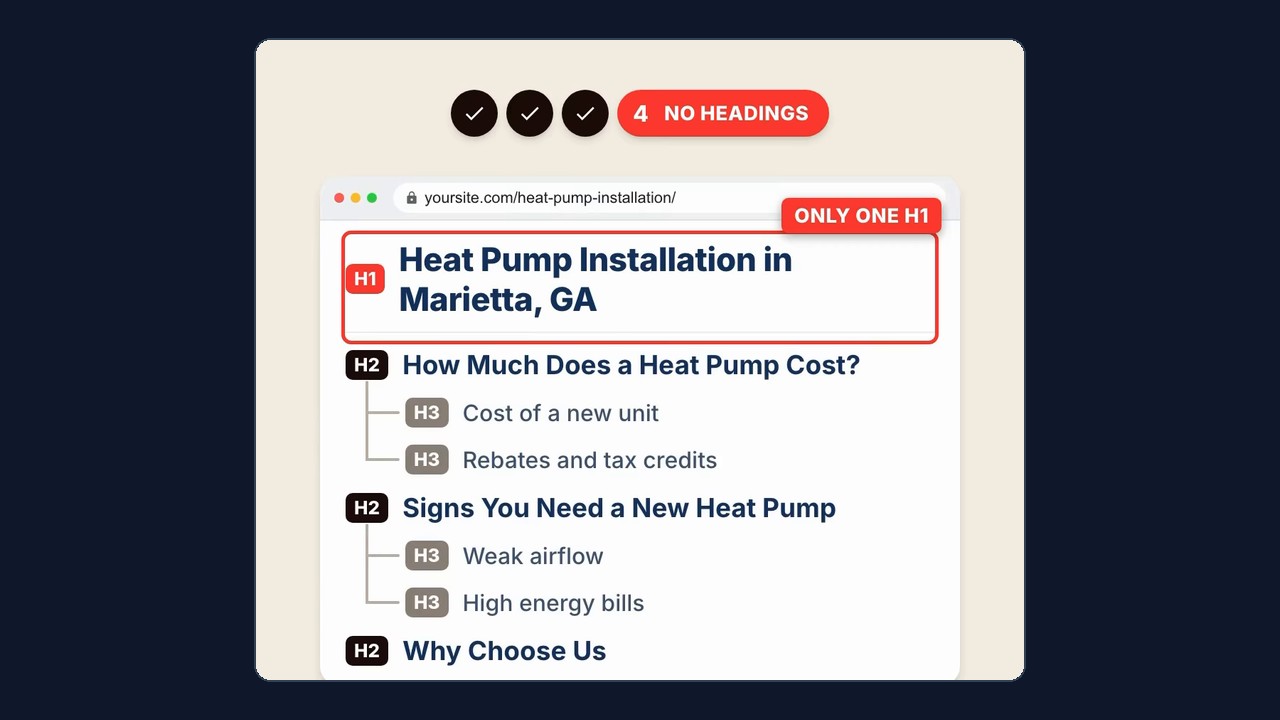
Structure every page with clear headings
Use one
H1for the page title with your keyword in it,H2s for the main topics, andH3s nested under them for subtopics. Clear headings help people, Google, and AI search understand your page. In the creator's example: H1 "Heat Pump Installation in Marietta, GA", H2 "How Much Does a Heat Pump Cost?" with H3s "Cost of a new unit" and "Rebates and tax credits". Reel Playbooks addition: in most editors, headings are set from the text style dropdown (Heading 1, 2, 3); avoid making text look like a heading by only making it bold or bigger.
Heads upCommon mistakes & tips
Don't skip the sitemap check after big changes. Resubmit it whenever you add a batch of new service or location pages.
One page per service, not one page per keyword variation. "Heat pump installation" and "heat pump install" belong on the same page.
City pages without real projects or reviews are better left unpublished; thin duplicates can hurt the whole site.
Keep exactly one H1 per page. Many themes already use the page title as the H1, so don't add a second one in the body.
Link related pages together: each city page should link to the matching service pages, and the reverse.
MeasureHow to know it worked
In Search Console, the sitemap shows a Success status and the Pages report lists your service and location pages as indexed. Within a few weeks, the Performance report should show impressions for service searches such as "heat pump installation" plus your town, landing on the matching service page rather than the homepage. A quick check: search site:yourdomain.com in Google to see which pages are indexed.
ProvenanceSource & adaptation notes
Original
The caption and narration list four mistakes and fixes: submit your sitemap in Google Search Console so your site is indexed, give every service its own page and URL, avoid AI-written city pages that only swap the city name (Google's scaled content abuse policy) and instead feed AI real experience, projects, and reviews, and use one H1 with your keyword, H2s for main topics, and H3s for subtopics. The video shows example screens for each fix using a heat pump installer in Marietta, GA.
Reel Playbooks additions
Reel Playbooks additions: common sitemap URLs and the Pages report check, what to include on each service page, an example AI prompt for local pages, how to set headings in a site editor, links to Google's sitemap guide and spam policy, measurement in Search Console, and the tips on resubmitting sitemaps, keyword variations, thin pages, single H1s, and internal links.
AttributionCredit
Original tips by Tony Jung (@tony_does_local_seo) on Instagram (watch the original reel).
Adapted from @tony_does_local_seo's video; steps expanded by Reel Playbooks.
Reel Playbooks credits and links to the original creator. See For creators to request changes or removal.